 USA
USA France
 Spain
Spain
MLA Format Heading and Header: A Complete Step-by-Step Guide with Examples
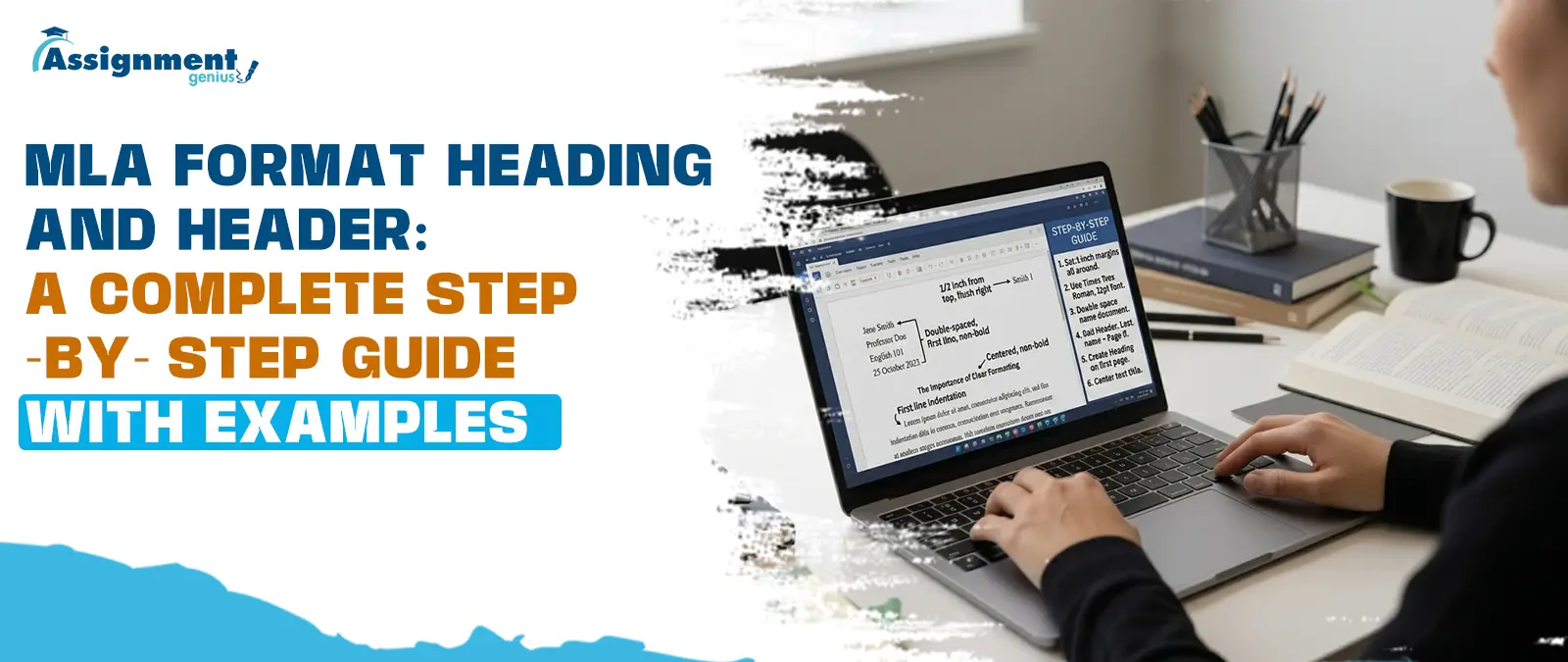
Your confusion about where to place your name or page number in a Word document has brought you here. And that's chaos is totally understandable, as there are many aspects that are responsible for thoughts being provoked, such as terms like Heading and header sounding almost identical. Come to the practical situation now, both of them are different about the MLA heading format. As a result, learning to format an MLA heading is an essential skill for all students.
After understanding the MLA heading format and the MLA header format, they also receive praise for your writing in the words like clean, professional, and academically credible.
As you complete reading the final word of this guide, you will have covered everything that counts, beginning with the four-line heading on the first page, to the most common mistakes that students tend to make without knowing it.
What is an MLA Format Heading vs an MLA Header?
Before you tap into the rules, it is better to understand what actually means of these terms. By doing this, we can dodge one of the most frequent errors that take place when we set up the papers.
MLA Format Heading
It is referred to as the Information Block which is placed at the upper-left corner of the first page only. This box covers four lines of text: your full name, your instructor's name, the course name and number, and the submission date. Moreover, the heading replaces the need for a separate title page, which is that thing that MLA format generally does not require for standard academic papers.
MLA Format Header
Your last name together with the page number, is what you should have in your header. This information has to be located on the top right-hand corner of each page of your document, including the title page. The header is a repetitive element whereas the heading is an occasional element. It is important to have this fundamental understanding firmly in your mind before you jump into how to do MLA format heading correctly: One block, one page, one time; One line, every page, every time.
Way to Remember Forever
The heading introduces you to the reader on page one; on the other hand, the header keeps track of your work across every page. These terms follow strict formatting rules, and together they form the professional presentation that MLA-style papers are well known for.
How to Do MLA Format Heading: The First Page Essentials
It's a simple process to set up an MLA format paper heading, if you know how! But this is where things drastically shift for students. First, note that this is the heading for the entire document, and so each of the lines will be formatted just like the body of the text. For example, you may want to use a clearfont e.g. Times New Roman, 12 point, left-aligned and double-spaced.
There are four main lines to a proper MLA format heading
- Distinguished by using First Name + Last Name (full name)
- Your instructor's name (usually "Professor" followed by his or her last name).
- The course and its number (English Composition 101).
- The month and year due (Day Month year Format)
The next four lines, beginning at the very next line on your page, should be centered and to the left, have your paper's title. A large, bold and capitalized Title Page like the rest of the text and is not skip-capitalized, italic, or underlined. Needless to say, the first paragraph just brushes the edge of the second paragraph, which is one double space below!
Now, the second most underrated but important, is the setting of the margins. In MLA style, it should go 1-inch wide around the paper. You can avoid having to change the margins later, when you've already set your margins to the proper size, before you start typing your heading.
Proper MLA Format Heading Order
The arrangement of the four lines in an MLA heading format is set; you can't do anything, even the order changes. Also, consider writing the information in the correct order.
Always the correct order is:
| Line Number | Content | Example |
| Line 1 | Student's Full Name | Maria Johnson |
| Line 2 | Instructor's Name | Professor Williams |
| Line 3 | Course Name and Number | English 101 |
| Line 4 | Date of Submission | 25 April 2026 |
Be aware that your name is always first. The Course information is provided in the third, which acts as the context for the assignment. Finally, the date is the end of the heading block and gives a record of your submission.
Some students may put the date on the second line or the instructor's name at the end. This will not follow MLA format, and a professor who is knowledgeable in MLA format will know it. So, it is one of the best things you can do before writing any essay in the MLA style: memorizing this four-line order.
The Correct MLA Date Format Heading
One of the smaller elements of an MLA format date heading is the date line, and it is one of the elements of an MLA heading that is most often misspoken. Students have experience with writing dates in the form of Month Day Year (e.g., April 25, 2026). But as far as MLA format is concerned, then it should be written in a different order.
The proper date format heading in MLA style is Day Month Year (as in 27 June 2014 – note that the month name and the year are separated by no comma). For example:
- Correct: 25 April 2026
- Incorrect: April 25, 2026
- Incorrect: 04/25/2026
- Incorrect: April 25th, 2026
Getting the MLA date format heading right comes down to three non-negotiable rules. You should be aware from the fact that the month should be not be written with any abbreviated form. Plus, no suffixes after any day number, like 1st, 2nd and 3rd. If you get one line right, you are at least a little more serious as an academic writer, since you are a master of the intricacies of formatting in MLA style.
Creating the Proper MLA Format Header (Running Head)
Now that we've finished our MLA format page header, we can now get to the next part of your paper that will be on every page, the MLA Running Head/Running Header. Your last name and page number will be on the right side in the top corner of each page and will be legible.
The Format
Last name, followed by one space, followed by page number. There is no punctuation between them, no word like “Page”, no word abbreviation like “p.”” before the number. If the last name is Johnson and on page number 3, you can simply write: Johnson 3 in the header.
How the header looks on the paper. The header is contained in the header portion of the paper just above the 1" margin, and about 0. 5" away from the top of the page. It is also in the right hand corner, and uses the same type of font and size as the body of the paper.
Questions like ‘’why is not the header on the first page? Usually floats in the mind. But, the running head is to be comes in the form of repetition, including the first page. This thing is embedded as per the MLA guideline. And if your teacher prefers that the beginning should be header on page two, then make sure to cross-check it.
Formatting the Header in Microsoft Word and Google Docs
Knowing how to MLA format header is one thing, but actually setting it up in documents like Microsoft Word and Google Docs is another. And that is where most of the students face technical trouble. Factually speaking, both writing platforms make the process relatively straightforward once you know where to look.
In Microsoft Word
- Double click in the header area to edit the header section
- You now enter the header, and use the Tab key twice to get your cursor to the right hand end of the page, or alternatively align the right hand side of the text as you did to the right to the right side by using Ctrl + R.
- Type your last name and enter the spacebar once, then click on Insert, under Page Number, select Current Position, and select Plain Number.
- Make sure that you be consistent with the font throughout your doc, and usually it is advised to keep the font around 12 with Times New Roman.
- 0.5 Inches should be the standard gap between the header and the top of the page, and the same as well for the footer.
In Google Docs
- On the top menu, click on Insert and then select Headers and Footers, and choose Header.
- Type in your family name, including the space.
- Next, go to Insert again and click on Page Numbers to insert the automatic page number
- Right-align the entire header line using the alignment button in the toolbar
- The Header margin should be 0.5″ from the top, as shown in the image below under the File - Page Setup option.
If your teacher requires a different heading on the first page, you can check the box "Different first page" on both of the platforms. Regardless of whether you are using a computer or handwriting, the purpose of the header is the same: Your last name and page number aligned to the right, 0.5" up from the top, and repeated on every page. If you don't, do not check this box and the running head will show up (the running head will show up always starting at the first page).
MLA Format Essay Heading Example
The easiest way to see all of these rules in one place is to see an entire header in MLA format example with each element properly formatted as it would be on an actual paper. Write with an easy-to-read (no embellishment) 12-point font, such as "Times New Roman," double space your paper, and left-justify your paper.
Maria Johnson
Professor Williams
English Composition 101
25 April 2026
The Psychological Impact of Social Media on Adolescent Identity
Social media platforms have transformed the way young people construct
and present their identities, raising important questions about authenticity,
self-esteem, and mental well-being in the digital age...
What to observe in this example:
- The four 'Heading' lines will be double-spaced, left-justified.
- The title is centered, but does not include bold, italic or underlined instructions.
- The title is not rendered bigger than the body, to the point of distracting from the content.
- Extra blank line that separates the heading and title, or separates the title and the first paragraph.
- Your lines are double spaced, and there is no variation in the spacing.
As per the MLA format header example, it would be clear that the running heading should be in the top right corner and appear as: Johnson 1 on this page.
The entire picture helps you to understand how these elements interact. The heading gives background information, the title gives a preview of what the paper treats, and the header organizes the paper on each page.
Mastering MLA Format Headings and Subheadings within the Text
When short essays and the standard 5 paragraph paper arise, there's generally no need for any of the inside parts. Still, if you are writing a research paper, a thesis, or even a comprehensive analytical essay, the application of MLA format section headings and subheadings are useful devices to organize your material and guide your reader through your complex arguments. The strongest contrast with the APA publication is the heading sequence, for these are not numbered at all in the MLA.
Instead, guidelines in the MLA Handbook suggest a hierarchy that writers can, when the time comes, modify for their own paper, for breadth and depth. What one must try to remember is Truth is your uppermost level 1 titles of the section should be maintained uniformly through the expository paper, whatever style it is for the MLA heading format.
The generally recommended MLA heading hierarchy is as follows:
- Heading Level One: Boldface, capitalized, aligned left (major sections)
- Heading Level Two: Italics, capitalize heading, and align left (sub-sections in major sections)
- Heading Level Three: Bold and italics, title case, align left (very rare, sub-subsections)
MLA headings of each section cannot be centered automatically just like other MLA styles of formatting; they should only be centered if the specific instructions come from an individual teacher or publication. It should align to the left margin (just like paragraphs), and it should leave double spacing before and after paragraphs.
Also, unlike some scientific papers, MLA doesn't use numbers before the headings. The number 3.2 is used to indicate the results of the survey; it is in a style that would not belong in an MLA research paper. Rather, the heading should be "Survey Results," bold, and flush left.
Wherever possible, use internal headings to make longer papers easier to read. They help the reader see when something changes, help to visually break up a long text section, and can help an instructor follow your argument when grading.
Common Mistakes to Avoid with MLA Formatting
Students who are otherwise careful about the proper MLA format heading tend to make only a few common errors with regards to the formatting of headings and headers in MLA papers. It is so advantageous to be aware of these as they arise before you submit because it allows you to be in a better position.
Mistake 1: Adding "Page," "Pg.," Or "P." Before The Page Number In The Header
The running head must have your surname followed by the page number (no other information). It is improper and unprofessional to write "Johnson p. 3" or "Page 3".
Mistake 2: Bolding, Underlining, Or Italicizing The Paper Title
The title of your first page should be in text, no need to use B or I. One of the most frequently made mistakes by instructors is using the title in a manner similar to that of a book title or a special label.
Mistake 3: Single Spacing Anywhere In The Heading
You should be well-informed that you should use double-space all lines of the MLA heading, including the 4 line block heading at the top of the page.
Mistake 4: When adding a Title Page.Mistake 4: When adding a Title Page
If we talk about the MLA format for essay heading, then you must know that a standard academic paper does not require a title page.
Mistake 5: Avoid writing a Four Line Heading Block
Make sure that the heading block should be located on the left-hand side of the document. And it must contain your name, teacher's name, course title, and the date.
Mistake 7: Not Covering The Header On The First Page
Some students believe that the running head begins on page 2. You have to use the header on every page except when told otherwise by your instructor, including page 1.
Comparison: Heading for MLA Format vs. APA Format
Students who write papers in several disciplines are likely to use both MLA and APA styles and this will present a problem because the difference in the structure of a heading is substantial. Knowing the difference between the two system will help you avoid in-cross contaminating the styles.
| Feature | MLA Format | APA Format |
| Title Page | Not required for standard essays | Required for most academic papers |
| First-Page Heading | 4-line block (Name, Instructor, Course, Date) | Covered by the title page |
| Running Head | Last Name + Page Number (top right) | "Running head: TITLE" on page 1, then shortened title on subsequent pages (7th edition simplified this) |
| Internal Headings | Optional, flexible hierarchy | Five strictly defined heading levels |
| Heading Alignment | Flush left for all levels | Centered for Level 1, flush left for others |
| Date Format | Day Month Year (25 April 2026) | Year only on title page |
The most significant point of this comparison is that there is no requirement for a title page in standard MLA format for paper heading. Consequently, it is vital to have a first page heading, as this is the only place the reader learns who wrote the paper, what course it is for, and under which instruction. That information is required on a separate cover page, and the use of the first-page heading is less essential to the body of the paper in APA format.
If the student is doing a paper in several disciplines, it is always good practice to have a style guide reference open while formatting the paper. It's very easy for instructors to detect when MLA and APA are mixed in the same essay (when they aren't supposed to be).
Here are the last steps for creating a perfect MLA paper heading.
Final Checklist for a Perfect MLA Paper Heading
Before putting your work for the final submission, make sure to tick off this checklist of MLA headings and headers to avoid duplicate work and editing.
First-Page Heading:
- It is essential to keep in mind that your last name is aligned to the left and appears on the first line.
- The second line (with the proper title, e.g., Professor) must keep the name of your instructor
- Be sure that the name and number should be on the third line
- Make sure that the date should be on the 4th line in the right format
- It is very basic that all lines must be double-spaced and left-aligned.
- Keep in mind that 1" margin all around the page to maintain the uniformity.
Paper Title
- It is mandatory, as per the rule book, that the four-line heading above the title is centered.
- Make sure that the title should not be set in bold, italics, or underlined unless there is a quotation marks.
- The font size and style are consistent with the rest of the paper
Running Header
- As per the MLA formatted header guideline, you will have to make sure that the name and page number are placed in the top right corner of each page.
- Space line of the header is lined up with 0.5".
- It should be in the rule book that the font in the header is consistent with the body of the paper.
- For Level 1 Bold, Title Case, And Flush Left
- For Level 2 Headings: Appear flush left, are italicized, and are title cased.
Internal Headings (if applicable)
- Level 1 headings are BOLD, TITLE CASE, and FLUSH LEFT.
- Level 2 headings are italicized and title cased, and appear flush left.
- The use of heading levels is consistent throughout the paper.
General Formatting
- The entire text is double-spaced (including the heading)
- The font size is 12 points and Times New Roman (or a font that your instructor approves that is readable).
- The paragraphs are indented 0.5 inches (one Tab press).
Keeping this checklist close every time you sit down to work on a paper means you already know how to do MLA format heading and header setup correctly before you type a single word of your essay.
Frequently Asked Questions
Does the MLA heading go in the header section?
No, and one of the most significant differences to grasp. The name of the MLA student, the instructor of the MLCA course, the course title, and the date of the assignment are set in the document and typeset into the body of the text on the first page. It is NOT in the header part of your word processor!
Is the MLA format heading double-spaced?
Yes, absolutely. The heading block is a 4-line block, and looks like all other parts of the paper. No Black "Space" anywhere in the document, including the heading. In the start of the body of the paper is double-spaced from the end of the heading.
What font should I use for an MLA heading?
The MLA handbook should use a font that is easy to read, and for that it is advised to carry the Times New Roman with standard size of 12-point.
Should the title be bolded as per the MLA format?
No. The title of your paper will appear in regular, 'block' style text throughout the MLA format. Bolding, italicizing, underlining, or putting the title in quotation marks (unless it is the title of a book that is being referenced) are all formatting options that are not allowed for the paper's title.

Sources
- Boise State University Writing Center, MLA Style Guide 9th Edition — https://www.boisestate.edu/writingcenter/mla-style-guide-9th-edition/ Boise State University
- Scribbr, MLA Format: Complete Guidelines and Free Template — https://www.scribbr.com/mla/formatting/ Scribbr
- Indian River State College Library Guide, Formatting Your MLA Paper based on MLA Handbook 8th and 9th Editions — https://irsc.libguides.com/mla/paperformatting Indian River State College
- Paperpal, MLA Format Guidelines, Template and Examples — https://paperpal.com/blog/academic-writing-guides/mla-format-guidelines-template-examples Paperpal
- Editor World, MLA Header: Format, Examples, and Step-by-Step Guide, based on MLA Handbook 9th Edition — https://www.editorworld.com/article/mla-header Editorworld
- Editage Insights, MLA Headings and Headers: Formatting Style with Examples — https://www.editage.com/insights/mla-headings-and-headers-formatting-style-with-examples Editage Insights
Related Posts
-
 Feb 28, 2025Nila Allen
How to Cite Case Studies & Lab Manuals in APA
Struggling with tricky APA citations? Learn how to correctly cite case studies, lab manuals, and other unusual sources in APA 7th edition format.
Read More
-
 Apr 30, 2025Nila Allen
How to Cite a Case Study in APA Format -Step by Step Guide
Learn how to cite a case study in APA format with step-by-step examples. Avoid common mistakes & ensure proper citations.
Read More
-
 Jul 18, 2026David Warner
Master's Degree or Masters Degree? Correct Usage
Confused between master's degree and masters degree? Learn the correct usage, grammar rules, and examples to write accurately in 2026.
Read More
-
 May 23, 20262
How to Show Line Breaks in Poetry When Quoting
Learn how to show line breaks in poetry when quoting using MLA, APA, and Chicago styles with simple examples and formatting tips for students.
Read More